A powerful gaming PC is only part of the equation when it comes to competitive gaming. Your monitor plays a crucial role in how quickly you can react, track enemies, and enjoy smooth gameplay. High refresh rates, low response times, and adaptive sync technologies can make a noticeable difference in fast-paced titles like first-person shooters, battle royale games, and MOBAs.
Whether you’re climbing ranked ladders or participating in esports tournaments, investing in a quality gaming monitor can improve both performance and overall experience. This guide highlights some of the best gaming monitors for competitive players in 2026.
What Makes a Great Competitive Gaming Monitor?
Before choosing a monitor, consider these key features:
High Refresh Rate
A higher refresh rate allows the screen to update more frequently, resulting in smoother motion.
- 144Hz: Great entry point for competitive gaming.
- 240Hz: Ideal for serious players.
- 360Hz and above: Designed for professional-level esports performance.
Low Response Time
A response time of 1ms or lower helps reduce motion blur and ghosting, making moving targets easier to track.
Adaptive Sync
Technologies like NVIDIA G-SYNC and AMD FreeSync help minimize screen tearing and stuttering by synchronizing the monitor’s refresh rate with the GPU.
Resolution
- 1080p: Best for maximizing frame rates.
- 1440p: Excellent balance between image quality and performance.
- 4K: Stunning visuals but requires powerful hardware to achieve high frame rates.
1. ASUS ROG Swift PG27AQDP
Screen Size
27 inches
Resolution
2560 × 1440
Refresh Rate
480Hz
The ASUS ROG Swift PG27AQDP is one of the fastest gaming monitors available, making it an excellent choice for competitive FPS players.
Pros
- Extremely high refresh rate
- OLED technology with deep blacks
- Outstanding motion clarity
- Very low input lag
Best For
- Counter-Strike 2
- Valorant
- Apex Legends
- Overwatch 2
2. Alienware AW2725DF
Screen Size
27 inches
Resolution
2560 × 1440
Refresh Rate
360Hz
This monitor combines a high refresh rate with vibrant OLED visuals and excellent color accuracy.
Highlights
- Fast response times
- Exceptional contrast
- Smooth gameplay
- Premium build quality
Ideal for gamers who want both speed and visual quality.
3. BenQ ZOWIE XL2566X+
Designed specifically with esports players in mind, the ZOWIE XL2566X+ focuses on responsiveness rather than flashy visuals.
Features
- 400Hz refresh rate
- Motion blur reduction
- Tournament-friendly design
- Adjustable stand
- Excellent input responsiveness
Professional players often prioritize monitors in this category for competitive events.
4. MSI MPG 271QRX
This QD-OLED monitor delivers both speed and impressive image quality.
Why Consider It?
- 360Hz refresh rate
- Rich colors
- Fast pixel response
- Strong HDR performance
- Excellent gaming features
It’s a strong option for gamers who split time between esports and single-player titles.
5. Samsung Odyssey OLED G6
Samsung’s Odyssey series continues to be popular among competitive gamers thanks to its blend of speed and visual fidelity.
Advantages
- OLED panel
- High refresh rate
- Excellent contrast
- Smooth motion handling
- Modern design
It performs well in both competitive and cinematic gaming.
6. LG UltraGear 27GS95QE
LG’s UltraGear lineup offers reliable performance and low latency for serious gamers.
Key Benefits
- Fast OLED panel
- Sharp 1440p resolution
- Excellent response time
- Adaptive sync support
The combination of speed and image quality makes it highly versatile.
7. Acer Predator XB273U
A strong choice for players seeking excellent 1440p performance without stepping into the highest price range.
Best Features
- High refresh rate
- IPS panel with vibrant colors
- Low input lag
- Adjustable ergonomics
Suitable for both gaming and productivity.
8. Gigabyte M27Q X
This monitor offers outstanding value while still delivering competitive-level performance.
Highlights
- 240Hz refresh rate
- 1440p resolution
- KVM functionality
- Fast IPS technology
It appeals to gamers who also use their PC for work or content creation.
9. ASUS TUF Gaming VG259QM
If you prefer 1080p esports gaming, this monitor remains an excellent option.
Strengths
- Up to 280Hz refresh rate
- Low response time
- Affordable pricing
- Strong gaming features
Perfect for maximizing frame rates with mid-range hardware.
10. Dell G2725D
The Dell G2725D provides dependable 1440p performance with a clean design and solid overall value.
Best For
- Competitive gaming
- General PC use
- Budget-conscious buyers
- Smooth everyday performance
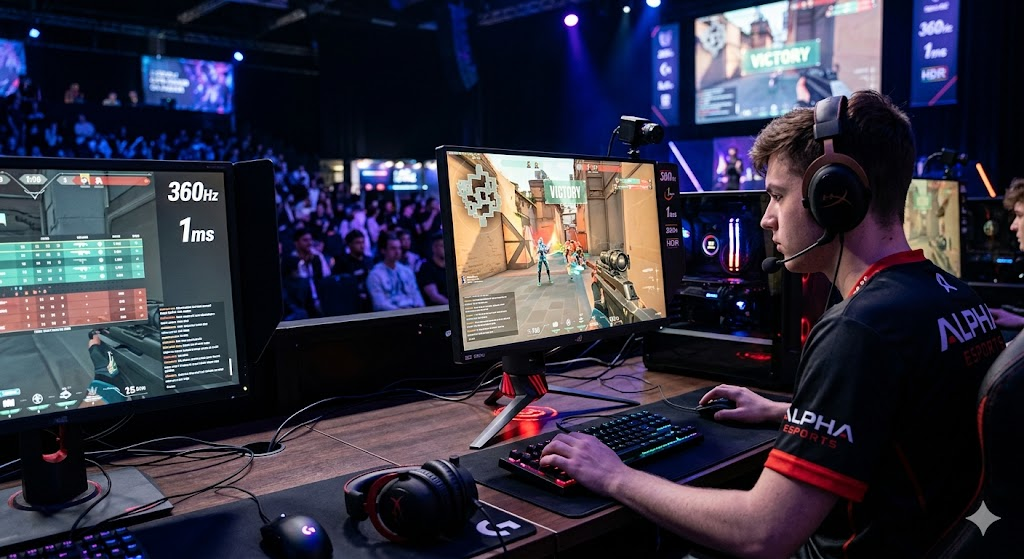
1080p vs. 1440p for Competitive Gaming
Choose 1080p If:
- You prioritize maximum FPS.
- You mainly play esports titles.
- Your GPU is mid-range or older.
- You want to drive refresh rates above 240Hz more easily.
Choose 1440p If:
- You play a mix of competitive and AAA games.
- You want sharper visuals.
- Your PC can consistently deliver high frame rates at the higher resolution.
For many gamers in 2026, 1440p offers an ideal balance between clarity and performance.
Recommended Refresh Rates
| Gaming Style | Suggested Refresh Rate |
|---|---|
| Casual gaming | 144Hz |
| Ranked multiplayer | 165Hz–240Hz |
| Serious competitive play | 240Hz–360Hz |
| Professional esports | 360Hz+ |
Higher refresh rates can improve motion smoothness, but they are most beneficial when your PC can consistently produce matching frame rates.
Features Worth Paying Extra For
When shopping for a gaming monitor, consider these extras:
- Adjustable stand with height and tilt controls
- USB hub for peripherals
- HDR support
- Anti-glare coating
- Thin bezels for multi-monitor setups
- Multiple HDMI and DisplayPort inputs
These features may improve comfort and usability over long gaming sessions.
Tips for Competitive Players
To get the most from your monitor:
- Enable the highest refresh rate in your operating system and GPU settings.
- Use DisplayPort or the appropriate high-bandwidth cable if required for maximum refresh rates.
- Turn on adaptive sync if supported by your monitor and graphics card.
- Keep your graphics drivers up to date.
- Match in-game settings to your hardware to maintain stable frame rates.
Consistency is often more important than pushing every setting to the maximum.
Conclusion
The best gaming monitor for competitive players depends on your priorities and budget. If raw speed is your focus, ultra-high-refresh displays such as the ASUS ROG Swift PG27AQDP or BenQ ZOWIE XL2566X+ are outstanding choices. Gamers seeking a blend of performance and image quality may prefer OLED options like the Alienware AW2725DF, Samsung Odyssey OLED G6, or MSI MPG 271QRX.
Ultimately, pairing a fast monitor with a capable gaming PC and stable frame rates can significantly enhance your experience in competitive titles. Whether you’re aiming for smoother motion, lower input lag, or a visual upgrade, investing in the right display is one of the most impactful upgrades you can make to your gaming setup.